
Construction projects today involve complex schedules, multiple teams, and large data flows. Modern construction management software features help contractors keep everything on track. By centralizing information, automating processes, and providing real-time insights, these tools transform how infrastructure and building projects are managed. For example, one engineering firm discovered scheduling conflicts in real time after adopting integrated software with mobile updates, cutting idle crew time by over 20 %.
Before using the software, project managers lacked visibility into on-site changes, so work often had to be redone when plans changed. Such success stories show that robust software features can prevent delays and reduce costs by revealing hidden inefficiencies. In 2025, the following ten features have become essential components of any construction management platform. Each feature is explained with practical examples of how it improves productivity, communication, and quality on jobsites and in offices.
Table of Contents
10 Must-Have Construction Management Software Features in 2025
1. Real-Time Communication and Collaboration
Construction projects rely on teamwork across architects, engineers, contractors, and clients. Modern software includes integrated messaging and collaboration tools so everyone stays in sync. Features like team chat, in-app comments on documents, and automatic notifications keep information flowing. For example, when an architect updates blueprints, the system instantly notifies field crews on mobile devices so they always work from the latest plans. A large construction company found that enabling these real-time updates cut coordination delays by over 30 % compared to relying on email and meetings. Key capabilities include:
-
In-App Messaging: Chat and discussion threads linked to tasks or drawings, avoiding lost email chains.
-
Push Notifications: Instant alerts for schedule changes, RFIs (Requests for Information), or approvals, so delays are addressed immediately.
-
Client Portals: Secure web portals where clients and owners can view project status, approve invoices or selections, and ask questions directly. This transparency builds trust and reduces back-and-forth.
By keeping teams connected through the platform rather than siloed tools, these features greatly reduce miscommunication. In fact, industry surveys show that communication breakdowns are one of the top causes of rework on construction projects. Centralizing communication helps prevent common issues like a subcontractor working from outdated plans because the new versions were stuck in someone’s inbox.
2. Centralized Document and Data Management
Construction generates huge volumes of documents: blueprints, contracts, permits, photos, and more. A document management system in the software stores all files in one secure, version-controlled location. This means everyone on the team – from site crews to office staff – can access the exact documents they need, anywhere and anytime. For example, imagine a structural engineer revises a floor plan after an inspection. With a centralized system, she uploads the new drawings, and instantly every trade sees the update on their devices. No more outdated prints on site. Key elements include:
-
Version Control: The software tracks revisions so users can open any prior version and see what changed. This prevents confusion when plans are updated during construction.
-
Photo and Video Logs: Field users can upload site photos or video walkthroughs directly tied to projects or tasks. These become part of the project record, helping verify work and progress.
-
Integrated BIM/3D Models: Many platforms allow viewing 3D building models (BIM) alongside 2D plans. Teams can mark up these models to catch clashes (like plumbing intersecting a beam) early.
By centralizing data, teams eliminate lost files and ensure compliance. For example, one contractor used a digital document archive to handle permits and safety records. Inspectors could instantly retrieve required documents on site, which sped up inspections and kept the project moving. Centralized storage also enables powerful search and filter functions – a manager can pull up every change order or every photo from any given week in seconds, whereas before this would have required hours of searching through emails or paper files.

Suggested article to read: 10 Must-have Construction Accounting Software Programs to Watch in 2024
3. Advanced Scheduling and Resource Management
Keeping tasks on schedule is crucial. Modern software includes advanced planning tools like Gantt charts, calendars, and resource leveling to coordinate work. A Gantt chart view lets managers map out all tasks, their durations, and dependencies. When one task slips, the software automatically adjusts linked tasks and highlights the impact. For example, if plumbing is delayed, the system shows that painting must be pushed back. In practice, one general contractor used this feature to prevent overlapping crews. Their scheduling tool detected that the same framing crew was booked on two jobs simultaneously and alerted the project manager. Adjusting assignments early avoided a costly conflict and ensured every team worked steadily, improving overall schedule adherence. Key scheduling features include:
-
Task Dependencies: Set tasks that can’t start until others finish (e.g. electrical after drywall). The software enforces these links and flags scheduling conflicts.
-
Resource Assignment: Allocate crews, equipment, and materials to tasks. The system tracks availability so it won’t overbook a piece of equipment or a specialized crew.
-
Drag-and-Drop Updates: Easy interfaces let managers shift timelines by dragging bars, with the software cascading the changes to connected tasks automatically.
-
Calendars and Milestones: Visual calendars show major milestones (like permit approvals) and personal schedules, keeping teams aligned on key dates.
By automating these functions, teams gain “what-if” planning power. If a weather delay occurs, the software can reschedule affected tasks instantly. As a result, one project saved weeks by simply inputting a two-day rain delay and letting the tool re-sequence activities. This kind of proactive planning avoids the chain reactions of delays and keeps projects on target.
4. Financial Management and Cost Tracking
Staying on budget is one of the hardest parts of construction. Robust software integrates cost controls, estimating, and billing all in one place. For instance, an estimating module lets users build a cost breakdown by material and labor. During the project, actual expenditures are recorded against that estimate so managers see exactly how costs compare. When changes occur (as they often do), change orders are generated and tracked automatically, updating the budget. One mid-size builder reported that before using such a system, hidden change orders had quietly increased costs by 15 % on many jobs. After switching to integrated budgeting tools, every change order was logged and accounted for, preventing these silent overruns. Critical financial features include:
-
Detailed Estimating Tools: These calculate quantities, labor rates, and markups quickly. Good estimating software can auto-sum cost lines and suggest values based on past projects.
-
Budget vs. Actual Tracking: Real-time dashboards show current spending against original estimates. Any overruns appear instantly, alerting managers to investigate or adjust plans.
-
Change Order Management: Teams can create change orders on the spot, have them approved electronically, and have the system adjust the budget automatically. This ensures that scope changes are captured rather than lost in negotiation.
-
Invoice and Payment Processing: The platform can generate client invoices based on completed work or milestones. Some systems even integrate payment gateways so clients can pay online, speeding up cash flow.
This financial visibility pays dividends. For example, by using software to track daily material costs, a contractor noticed their concrete usage spiked on weekends. Investigating, they found forms weren’t being reused efficiently on off-days. With that insight, they tightened their process and saved thousands of dollars. In summary, built-in cost tools mean decisions are based on up-to-date numbers, not best guesses.
5. Mobile Accessibility and Field Data Capture
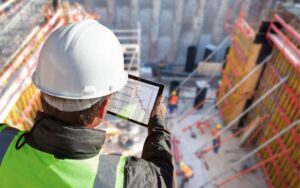
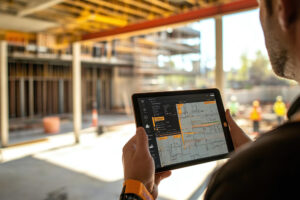
Construction happens in the field, not just the office. The best software offers full mobile apps so supervisors and crews can work anywhere. Mobile access means every feature—plans, schedules, messaging, time tracking—mirrors the desktop version. On the job site, workers can immediately log hours, record weather, capture photos of completed work, and report issues. For example, a foreman might use a tablet to log that an inspection passed and take a picture of the final installation.
The software syncs this data instantly, updating stakeholders back in the office. In 2024, studies found that field apps can save around one hour per worker per day by eliminating end-of-day paperwork. In practice, one firm saw that crews using the mobile app ended each day with a fully updated daily log, whereas before they needed two office staff members to compile reports each night. Key mobile features include:
-
Offline Mode: If cell service is spotty, field users can still enter data. Once connected, the app syncs everything.
-
Camera Integration: Users snap photos of defects or progress directly in the app. Photos are tagged to the right project phase or location and stored with the task.
-
On-Site Checklists: Safety forms, punch lists, and inspections can be filled out on devices. The data then flows into the system, reducing double-entry.
-
GPS and Time Tracking: Apps can log who is on site and when. This helps verify time on task and supports accurate payroll and reporting.
The net effect of true mobility is faster decision-making. When something important happens on site, the office doesn’t have to wait until tomorrow’s meeting to find out. This live loop between field and office significantly shortens feedback cycles. For example, one project manager noted that using mobile reports allowed them to catch and correct a placement error the same afternoon it occurred, rather than finding out in the weekly meeting after the error was complete.
6. Analytics, Reporting, and Dashboards
Data alone isn’t useful unless it’s turned into insight. Advanced construction software includes analytics tools and custom dashboards. These features aggregate data across all projects and visualize key performance indicators (KPIs) like schedule variance, cost variance, resource utilization, and safety incidents. For instance, a dashboard might show that labor productivity in one project is lagging while another is ahead, prompting managers to reassign resources.
Some platforms use AI or machine learning to predict issues — such as flagging if a project’s burn rate indicates a likely budget overrun. One builder used analytics to compare past projects and realized that weekday weather trends consistently delayed exterior work. Using that insight, future projects were scheduled with buffers, reducing unforeseen idle time. Typical reporting features:
-
Pre-Built Reports: Standard templates for project status, cash flow, and workload balance.
-
Custom Queries: Users can filter and group data (e.g. “Show all open punch-list items by trade”).
-
Trend Analysis: Graphs showing performance over time, helping identify patterns (for example, material costs rising).
-
Alerts and Notifications: Automatic warnings when a threshold is crossed (e.g. 90 % of budget spent with 70 % of work done).
These analytics turn raw progress and cost data into actionable intelligence. Rather than waiting for weekly updates, team members get a clear, quantitative picture of their project at any moment. For example, a project executive can glance at a health-and-safety chart and see if incident rates spiked this month, prompting a toolbox talk. This makes it possible to “manage by the numbers” instead of just gut feeling.

7. Integration and Open Platform
Construction work touches many specialties: accounting, procurement, HR, design, etc. The best software integrates with other systems so data flows seamlessly across tools. Common integrations include accounting packages (like QuickBooks), BIM and CAD platforms, CRM systems, or supply chain services. For example, integrating with an accounting system automatically links approved invoices to the company’s books without manual entry. Integrations save time and reduce errors: one general contractor linked their ERP to the construction platform and immediately eliminated duplicate data entry that used to cost them four man-hours per week. Key integration features:
-
APIs and Webhooks: Allow the software to push or pull data from almost any other system. This means you can connect scheduling data to payroll systems, or import supplier pricing directly into estimates.
-
Pre-Built Connectors: Many platforms offer one-click links to popular tools (accounting, CRM, storage, etc.).
-
IoT and Sensor Data: Some cutting-edge systems can ingest data from site sensors (for example, concrete strength sensors or equipment trackers). This brings field data into the project software for analysis.
-
Single Sign-On (SSO): Workers can use the same login for multiple tools, simplifying security and adoption.
By unifying the tech stack, teams work more efficiently. Instead of copying files between systems or manually reconciling spreadsheets, the project data ecosystem stays current. For instance, if a subcontractor updates a document in a file storage app, it automatically reflects in the project’s records. This connected workflow means less juggling of information and more time actually managing the project.
8. Quality, Safety, and Inspection Management
Construction sites must meet strict quality and safety standards. Software features in this area include digital inspection checklists, safety observation reporting, and quality control tracking. Users can pre-load standardized checklists (OSHA compliance forms, control checkpoints, commissioning steps, etc.), fill them out on tablets or phones, and instantly record the results. For example, a superintendent might walk a site with a tablet, ticking off permit checks and noting any safety hazards. The software logs all observations, photographs, and corrective actions in one place. If a critical safety issue is found, the system can automatically alert responsible managers. The benefits include:
-
Safety Meeting Documentation: Track attendance and topics of toolbox talks, helping ensure all compliance trainings are done.
-
Incident Reporting: Field staff can report near-misses or hazards immediately. The platform logs the details, triggering follow-up actions.
-
Punch List and QA/QC: When defects or incomplete work are noted, the software assigns tasks to resolve them. Tracking ensures nothing is overlooked before handover.
-
Regulatory Compliance: Store copies of safety certifications, permits, and insurance documents linked to the project. Reminders can warn when a certificate is expiring.
By using these features, teams maintain a record of quality and compliance from day one. One project manager noted that after moving punch lists and safety logs into a central system, the time to achieve final acceptance dropped by 25 % because fewer issues were slipping through the cracks. Keeping quality and safety in the same workflow as other project data also means problems are flagged in context — for example, a schedule delay can be traced to a failed inspection item.
9. Customer Relations and Client Features
Good client communication keeps projects on track. Many construction platforms now include CRM-style features to manage leads, proposals, and customer interactions, especially important for builders and design firms. A sales or business development team can track prospective jobs and client details within the same system that manages projects. Once a project is awarded, the client portal (mentioned above) lets clients see progress and invoices. For example, a homeowner remodeling her kitchen could log in to select finishes (cabinets, countertops) through the software’s selections tool, rather than exchanging emails. This transparency speeds decisions and reduces errors. Important elements of client-focused features include:
-
Lead and Opportunity Tracking: Log inquiries from potential clients and follow them through estimating to contract. This ensures no leads get forgotten and automates follow-up reminders.
-
Proposal and Contract Templates: Quickly generate professional proposals from saved templates or past projects. Some systems support e-signatures, letting clients sign contracts digitally.
-
Client Selection Management: Allow clients to make and approve choices (e.g. material options) within the app. The approved selections automatically update budgets and schedules.
-
Customer Dashboard: A simplified view for clients or owners to see key stats (milestones hit, payment status) without giving them full system access.
These features make the customer feel informed and involved. Clients often appreciate being able to log in anytime to check progress or approve a request. One contractor reported that after giving clients portal access, their questions and requests by phone dropped by half, because clients could simply check the system. For software teams in construction, this means managing client relationships and project execution hand-in-hand.
10. AI-Powered Intelligence and Emerging Tech
In 2025, artificial intelligence and data-driven tools are becoming standard construction management features. This includes predictive analytics, where the software uses historical data to forecast delays or cost overruns before they happen. For example, AI might recognize that a project with similar scope at the same location had habitually late inspections and warn the manager to schedule extra time. Other emerging technologies include:
-
Machine Learning Estimating: AI can analyze past bids and actual costs to suggest more accurate estimates. Some tools automatically adjust future estimates based on performance data.
-
Augmented Reality (AR) Integration: Cutting-edge platforms support AR so users wearing smart glasses can see overlaid plans on the actual site. This helps in visualizing hidden elements (like rebar or piping) and catching errors early.
-
IoT Sensor Integration: Drones and sensors can feed into the system. For instance, drones might scan progress on a roof and upload point-cloud data for comparison against 3D models.
-
Digital Twins: Advanced systems create a live digital replica of the site. If sensors detect moisture in concrete or if progress lags in one area, the digital twin reflects it, helping managers adjust work swiftly.
These cutting-edge features add a new layer of intelligence. They are not just novelties; they solve real problems. For example, one contractor used AI-driven scheduling to simulate multiple timelines and selected the one with the least predicted cost risk. Another used image recognition to automatically tally installed materials from site photos. By 2025, such innovations are moving from experimental to expected. Projects that leverage AI and smart integrations can not only respond to issues faster, but often anticipate them – much like how energy software once cut costs by running buildings smarter, now construction teams run projects smarter.
FAQs
How do construction management software features improve project efficiency?
Modern software centralizes data (plans, schedules, budgets) and automates routine tasks. This means teams always use up-to-date information and spend less time on paperwork. For example, an automatic alert for a scheduling conflict lets managers fix problems early, keeping the project on track with minimal delays.
What features should I look for in construction management software?
Key capabilities include real-time task scheduling, document version control, mobile field access, and integrated budgeting. Look for tools like Gantt charts, photo documentation, automated invoicing, and connectivity to accounting systems. These features ensure your team can plan accurately, share information instantly, and manage costs effectively.
Which new technologies are included in 2025 construction software features?
In 2025, many platforms include AI-driven analytics and IoT integrations. This can mean predictive scheduling (flagging likely delays), machine-learning estimates (improving accuracy from past data), and sensor data (such as concrete strength or equipment tracking) feeding directly into the project model. These tech-forward features help managers foresee issues and optimize work without manual guesswork.
Is it true that mobile access is now essential for construction management?
Yes. Mobile accessibility means on-site teams can enter data instantly (logging hours, sending photos, filling safety forms) and sync with the office. Field crews save time by using apps instead of paper logs or phone calls. In practice, a crew foreman can update the schedule or report a problem in seconds using their smartphone, so the office can respond immediately.
Conclusion
Construction management software features have evolved into powerful, interconnected tools that address every phase of a building or infrastructure project. By 2025, ten capabilities stand out as essential: real-time communication, centralized documentation, advanced scheduling, cost control, mobile field access, analytics dashboards, system integrations, safety and quality modules, customer-facing portals, and intelligent automation.
Together, these features turn fragmented processes into a unified workflow. Teams using them gain visibility into every detail – from labor hours and expense trends to on-site safety issues – enabling faster, data-driven decisions. In essence, the right software becomes the backbone of project execution: it prevents missteps (like working from outdated plans), reduces waste (through better coordination), and keeps stakeholders aligned.
Conclusion in practice: a cross-discipline office team can plan a sequence of tasks in the morning, field workers execute with mobile checklists, and by evening executives view updated progress and costs. This continuous loop of communication and feedback means projects advance smoothly. As one project director noted, “With all information in one place and everyone connected, we spend less time firefighting and more time actually building.”
Resources:
-
Fieldwire by Hilti. (2025). What is construction management software and how can it improve efficiency on the jobsite?
-
Projul. (2025). 10 Must-Have Features in Construction Management Softwares.
-
Capterra. (2024). What is Construction Management Software? Key insights for new users.
-
McKinsey & Company. (2024). Delivering on construction productivity is no longer optional.
-
WunderBuild. (2024). Case Studies: How Top Companies Use Construction Management Software.
For all the pictures: Freepik
Suggested article for reading:
8 Important Concrete Dashboard Metrics: Maturity, Thermal Differential, Crack Risk & Beyond
5 Sustainability from Concrete Monitoring Platforms Delivered on Modern Sites
Top 7 Concrete Monitoring Platforms Accelerating Curing & Cutting Rework in 2025
7 Air-Quality Platforms Construction Teams Use to Stop Dust & Silica from Delaying Projects